Outlook Customer Manager Mobile App for Android
Microsoft has officially retired Outlook Customer Manager. DejaOffice CRM Plugin for Outlook adds History, Followups, Scheduling and Real Mobile Apps to fully replace Outlook Customer Manager (OCM). Buy risk-free with a full money-back guarantee!
Replace Outlook Customer Manager (OCM) with DejaOffice PC CRM for Outlook
A CRM Solution that works with Outlook on your PC Desktop
An Outlook Add-In for Customer Relations Management
When a customer emails you, do you sometimes struggle to remember their past orders, or when you are scheduled to meet with them?
Wouldn't it be nice to have the customer history on the screen, as well as an easy way to create an followup task and appointment?
DejaOffice for Outlook can handle all these items and make your day more productive. It is not expensive and will quickly pay for itself in time savings and convenience.
Outlook Customer Manager officially discontinued
In December 2019 Microsoft announced they are officially retiring Outlook Customer Manager.  DejaOffice provides all features of Outlook Customer Manager plus the speed and security of storing your valuable Customer data on your local PC. DejaOffice provides tracking and followups, and reports. You never have to be a hostage of monthly cloud payments. DejaOffice is affordable. Choose from $8 per month or a one-time price if $99.95!
What is DejaOffice PC CRM?
DejaOffice PC CRM adds Customer Relations Managment to your Outlook Email App. With DejaOffice you can easily track all calls, meetings, tasks, emails and text with your customers, vendors, and associates.
Features of DejaOffice PC CRM?
- An Add-In is placed on the Outlook Email screen
- Shows key contact info for every email you get
- Drag and Drop an email to create a Task or Event
- One Click to access the full CRM
- Pin your Calendar and Call list to your PC Desktop
- Free USA Based Telephone Technical Support
- Does not require any Cloud, iCloud, or Exchange connection
- Works with IMAP/POP3/local folders
- Sync to Android and iPhone
- 90-day money back guarantee
DejaOffice PC CRM for Outlook Average User Rating: Average rating: 4.84 out of 5 based on 57 reviews. Free 14 day trial. Price $99.95
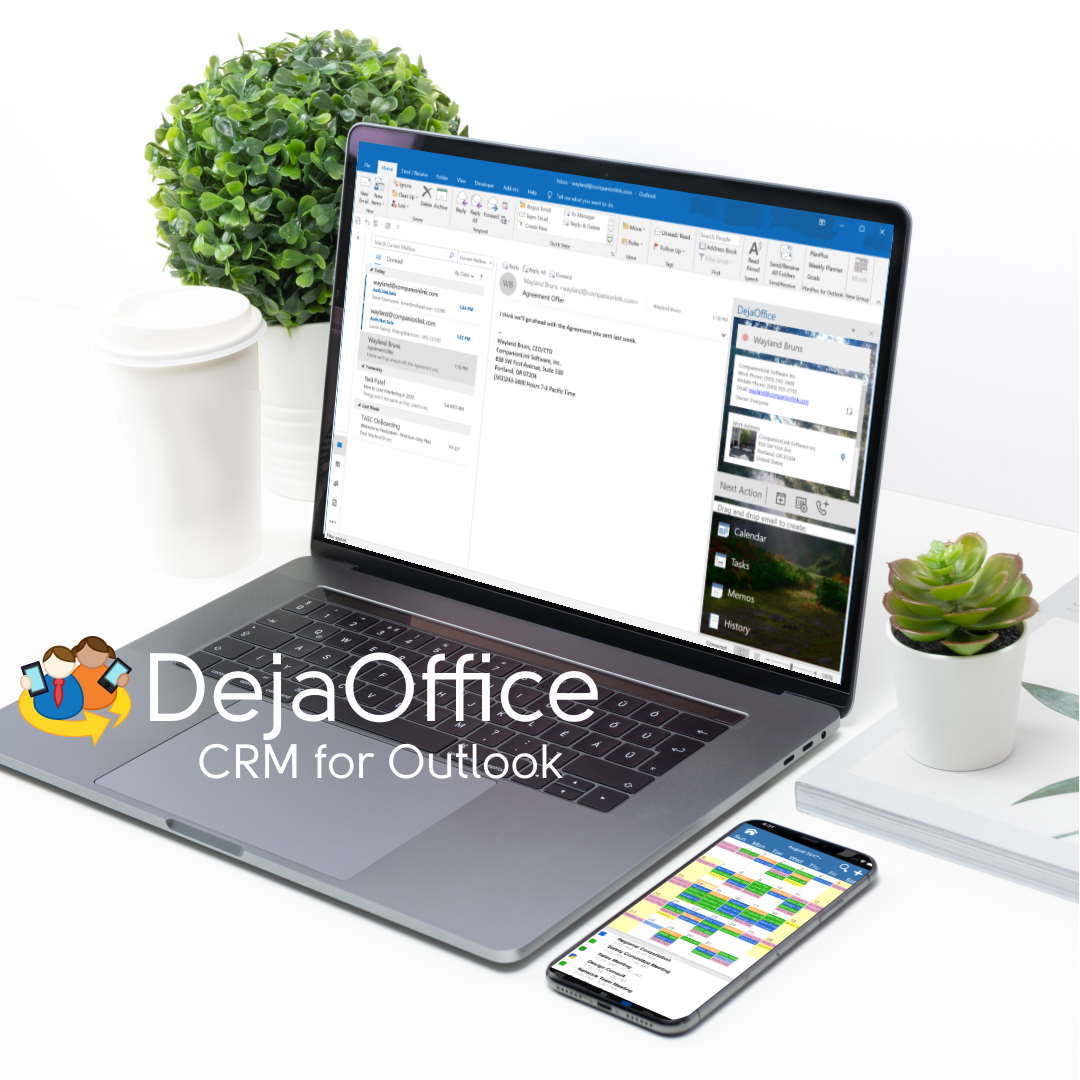
- USB, Wi-Fi and Cloud sync options
- One license for 3 computers; work, home, laptop
- US Based Telephone tech support!
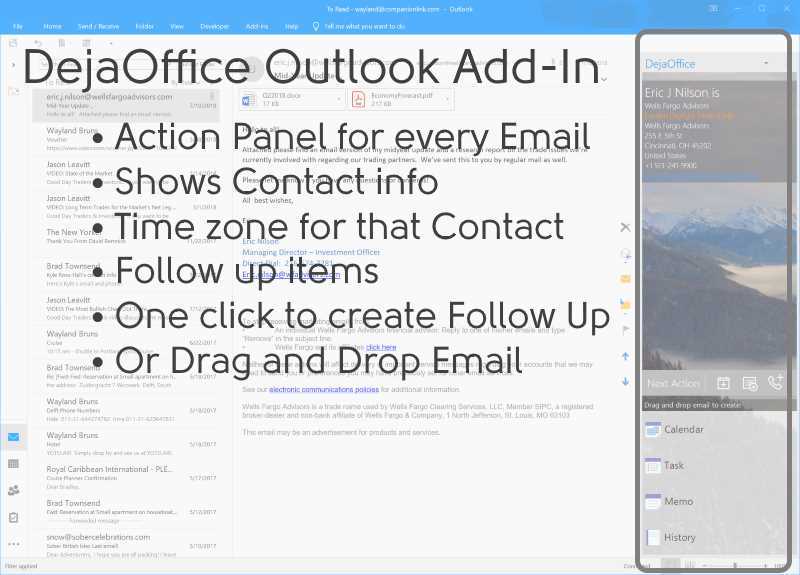
Setting Up the Outlook Add-In
On a new install of DejaOffice PC CRM, the Outlook Add-in will be enabled be default. Simply install the DejaOffice PC CRM and the Add-in will appear in Outlook as it's own panel.
The Add-In panel sits on the right side of your Outlook Email and Contact screens. As each email is selected, it shows the matching contact info in your database.
- Phone number and time zone for the contact.
- Notes and Custom Fields.
- One click to create Task or Event followup.
- Drag and drop email to make a Note or History item.
Setting up the DejaOffice for Outlook Add-In
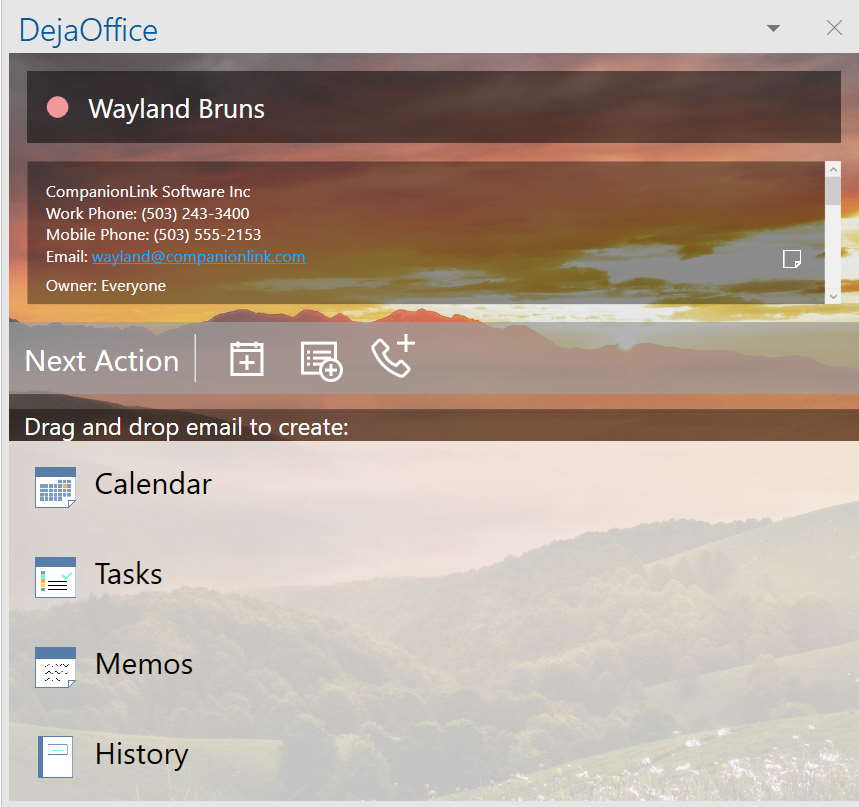
Using the Outlook Add-In
Setting up the DejaOffice for Outlook Add-In
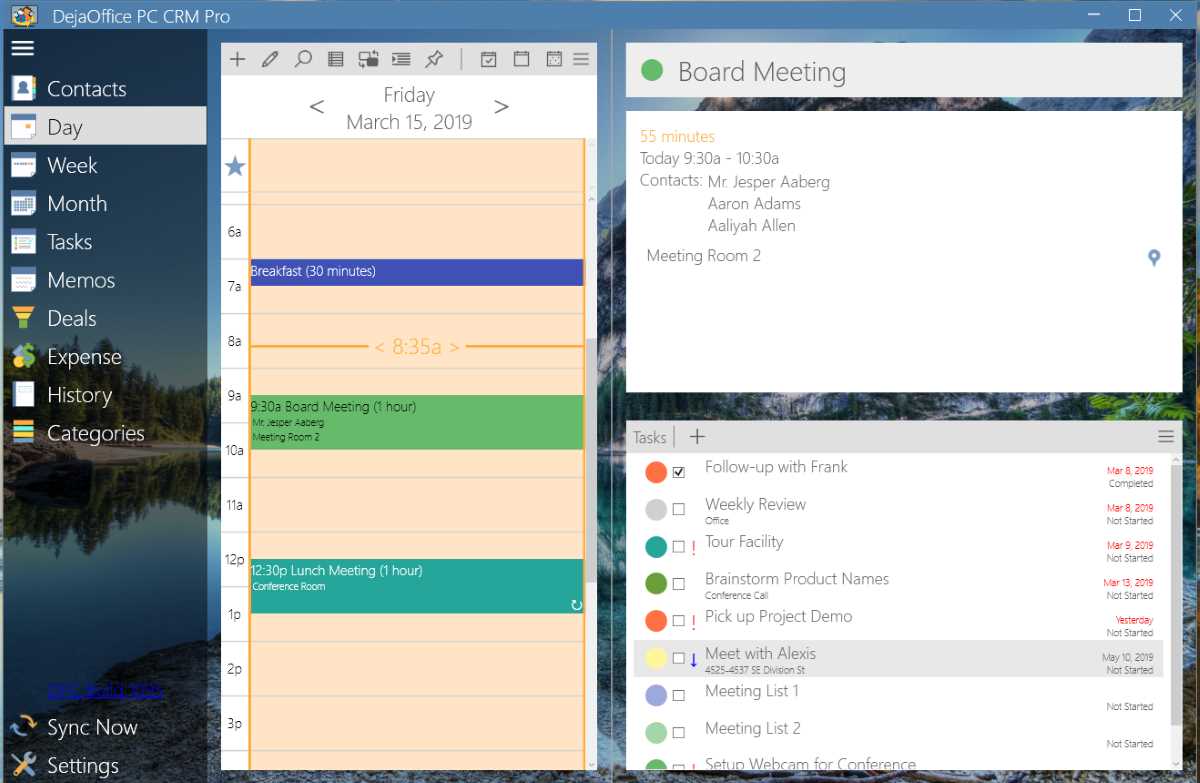
Daily Agenda View
A single view to show your appointments and tasks for today. Highly configurable for size and style.
- Daily appointments and tasks.
- Details for the next upcoming appointment
- Full support for category colors.
- Emojis for each event and task.
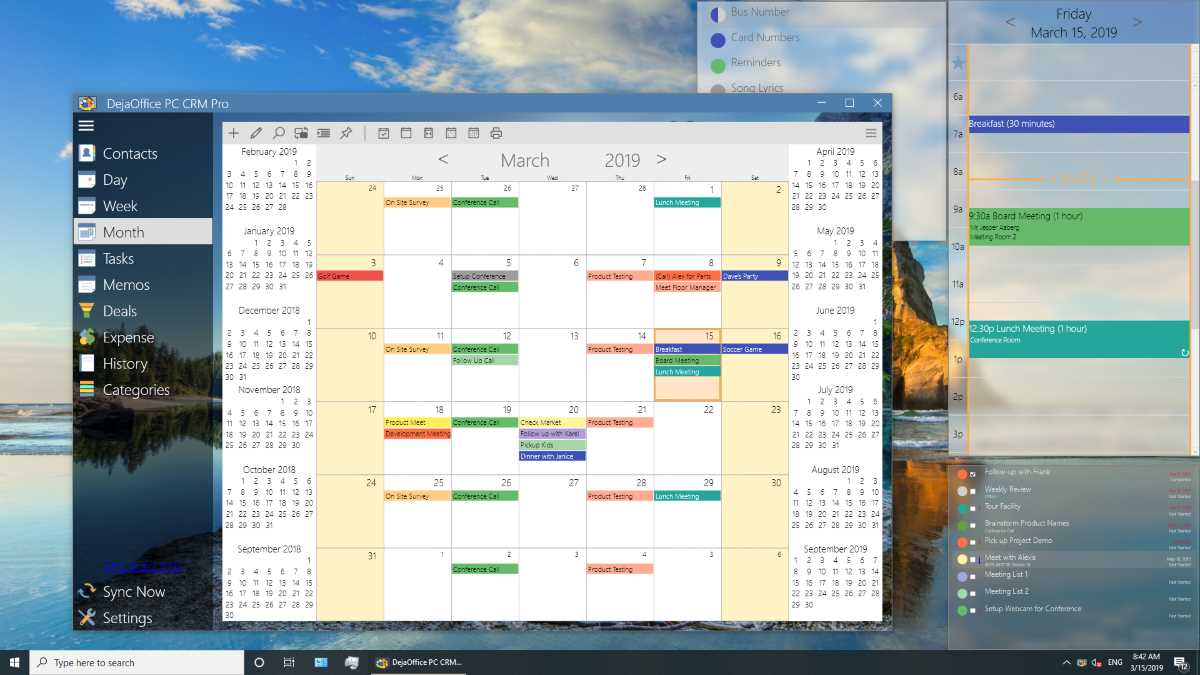
Month View and Pinned Windows
Pin any view to your PC Desktop. See your contact list and calendar without opening any app. Fully up to date view keeps you current during the day.
- Click on month view to see any day.
- Schedule new events from the Pinned view.
- Search Contacts and Tasks.
Sync using USB, Wi-Fi, Bluetooth or DejaCloud
Secure Sync - No need to share your data with Microsoft, Google or Apple. Fast and secure sync from your PC to your Phone. The more you use Outlook, the more you need CompanionLink and DejaOffice.
DejaOffice vs Native Apps on Android
Check out our comparison for DejaOffice CRM and Native Android Contacts, Calendar, Tasks and Notes.
DejaOffice vs Outlook App on Android
Check out our comparison for DejaOffice CRM and Outlook App Contacts, Calendar, Tasks and Notes.
No Exchange Sync
Exchange ActiveSync (EAS) was developed and licensed by Microsoft. There are many limitations of the protocol.
- Exchange based syncs are slow - taking 15 minutes or more to sync changes
- Calendar colors have limited support
- Exchange is not Outlook. You can easily sync Outlook without using Exchange
DPC Features
- Contacts, Calendar,Tasks and Notes -
- Unlimited number of Contacts, Calendar Items, Tasks and Notes. We have sites with up to 100,000 Contacts. Easily Search for any Contact based on Name, Company Name, Any Field, File As and on a custom field value (like Account Number)
- Contact Notes with Date
- Contact Notes field with optional Date label for each note.
- User Defined Custom Fields
- Define 10 Custom fields to store Account Number, Purchase Date, Customer Interest, Sales Region or anything else you need. *DejaOffice Express and Pro allow 20 custom fields.
- Day View, Week View, Month View, Calendar List
- Basic Calendar functions for Day, Week, and Month views. Recurring appointments, multi-day events, color caregories
- Grid view with Custom Columns
- Easily see your Contacts or Tasks as a grid, allowing easy import, export and batch operations. Select contacts and past them into Excel. Easily import Contacts from any Web Based CRM.
- Print List, Detail, Labels
- Print Contact List, Contact Detail, Day View, Month View, Task List, Notes.
- Create Document Templates for Print and Email
- You can create Mail-Merge forms for Email and Print using Document Templates. Make life easy by sending standard responses out to new customers.
- Automated Marketing through Email and MS-Word
- Use your CRM for Automated Marketing through Email and MS-Word Printing.
- Private, Masked and Hidden Records
- Mark any Contact, Calendar or Task private. Settings to mask or hide private records. Make sure no one sees your private data. Encrypt your whole database.
- Automatic Backup
- Automatically backs up every day or every week. Easy to move or restore backup.
- Easy Migration from your Contact Manager
- Import Contacts, Calendar, Tasks and Notes from Palm Desktop, Google, Outlook.
DPCO - Plugin for Outlook
- A Side Panel on your Outlook Email
- When you read an email - the Outlook Plugin shows you the matching Contact record, phone numbers, notes and history.
- Create an Appointment or Task from an Email
- Easily drag and drop an Email to create a new Calendar Event or Task
- Schedule a task for another Person
- Create a task and assign it to another person on your team.
- Move an Email to Customer History
- Store any email to Customer History - save the text body forever.
DPCX - Express Features
- Accounts, Groups and Secondary Contacts
- DejaOffice makes it easy to handle Accounts, Groups and Secondary Contacts An Account is a company record to which serveral Contacts belong to. A group (distribution list) is a set group of people that you email or market to regularly. Secondary Contacts are contacts that have a relation to another contact, like a Customer's Child record, or a Buiness Assistant record.
- Easy Migration from other CRM tools
- Import Accounts, Tasks and Communication History from Microsoft Business Contact Manager. Import Contacts, Activities, and History from Act! and GoldMine.
- Scan Outlook Email to History
- Automatically scan inbox and outbox to build Contact History automatically.
DPCP - Pro Features
- Multi-User Shared Files
- Set up a Multi-User Database on a shared on-premise server. Set individual passwords. Each record can have an "owner" and can control visibility for other users.
- Multi-User Scheduling
- A dedicated view that shows everything your team has scheduled for the day; Appointments and Tasks. When someone is absent you can easily drag and drop to assign the Appointment or Task to someone else.
Click here for all of our PC CRM Guides and Features
Portable License
Your license is for you, not your PC. When you buy a new computer, you do not need to purchase a new license. With CompanionLink you use your email address to register the software on a new computer.
US based company
CompanionLink is located in Portland, Oregon. Our servers are based in New Jersey to take advantage of proximity to international fiber network. Our servers are high technology and really fast!
RunStart and Premium Support
With CompanionLink you can call us at (503)243-5200 for support, Monday through Friday, 7am-3:30pm Pacific Time. For those with special needs, use our RunStart Service gives you a one-time hands on session with a top tier technician. Our technician will log into your computer, set up the sync, and ensure you are completely satisified with the solution. If you want this service regularly, use Premium Support for a full year and up to five service tickets.
DejaOffice
On your phone we feature DejaOffice CRM with PC Sync from the Google Play store. DejaOffice holds Contacts, Calendar, Tasks and Notes together, and with the same internal formats as in Outlook. DejaOffice synchronizes to Android Native Accounts for Contacts and Calendar.
If you don't want to use DejaOffice then simply set it to sync to native Android Contacts and Android Calendar.
We also offer sync to Google. Same product. One purchase. Switch your method at any time.
Outlook data we sync to DejaOffice
- Contacts
- Outlook Contacts sync to DejaContacts
- Names, addresses, phone numbers, email addresses
- Outlook categories and colors
- Contact notes
- Birthdays
- Calendar
- Outlook Calendar syncs to DejaCalendar
- Day, Week, Month and Year views
- Recurring and all-day events
- Alarms/reminders
- Busy/free flags
- Accepted meeting invites (with list of attendees)
- Multiple Outlook calendars (Requires CompanionLink Pro)
- Categories
- Outlook categories (contacts, calendar, tasks and notes) with colors sync to DejaOffice
- Tasks
- Outlook Tasks sync DejaTasks
- Task priorities
- Recurring tasks
- Due dates
- Complete tasks on Android
- Supports Getting Things Done, Franklin Covey, and Take Back Your Life formats
- Notes
- Outlook Notes sync to DejaMemos
- No character limit lets you edit and store long notes
By Nick G
on Nov 19, 2021
CompanionLink for Outlook
By Bobbi-Jo
on Nov 12, 2021
CompanionLink for Outlook
By Craig W
on Nov 6, 2021
CompanionLink for Outlook
Great support from Michael
CompanionLink for Outlook
Tiffany D, was exceptional!
By Wayne R.
on Nov 1, 2021
CompanionLink for Outlook
By William P.
on Nov 1, 2021
CompanionLink for Outlook
What makes our software unique
- Free US-based telephone support
- Full support for Categories and colors
- Supports contacts, calendar, tasks, notes
- USB, WiFi, Bluetooth, DejaCloud, and Google sync
- Works with Android, iPhone, iPad
- Full contact notes, contact pictures, alarms
- Automatic data encryption on device
Outlook Versions
- Office 365 Pro Plus
- Office 365 Business
- Office 365 Home Sync with Android
- Outlook 2021
- Outlook 2019
- Outlook 2016
- Outlook 2013
- Outlook 2010
- Microsoft Business Contact Manager 2013
- Microsoft Business Contact Manager 2010
- Microsoft Business Contact Manager 2007
- Outlook 32-bit
- Outlook 64-bit
- Supports MS Exchange Public Folders visible in Outlook
- Supports MS Exchange Shared Folders visible in Outlook
- Outlook IMAP Folder
- Outlook POP3 Folder
- Outlook iCloud folder
- Outlook Google Apps folder
- Outlook.com
- Hotmail.Com
- Office 365 secure USB sync
Last modified: Oct 1, 2021 12:23 pm
Outlook Customer Manager Mobile App for Android
Source: https://www.companionlink.com/replace/outlook-customer-manager/
0 Response to "Outlook Customer Manager Mobile App for Android"
Post a Comment